<?xml version="1.0" encoding="utf-8"?><feed xmlns="http://www.w3.org/2005/Atom" ><generator uri="https://jekyllrb.com/" version="3.10.0">Jekyll</generator><link href="https://kunalkhosla.github.io/blogs/feed.xml" rel="self" type="application/atom+xml" /><link href="https://kunalkhosla.github.io/blogs/" rel="alternate" type="text/html" /><updated>2026-04-27T12:23:40-04:00</updated><id>https://kunalkhosla.github.io/blogs/feed.xml</id><title type="html">Engineering Dispatches</title><subtitle>A small hand-bound journal of reverse-engineering, home automation, and whatever else won&apos;t yield to the obvious solution.</subtitle><author><name>Kunal Khosla</name><email>khosla.kunal@gmail.com</email></author><entry><title type="html">I renamed every automation in my house and found four bugs</title><link href="https://kunalkhosla.github.io/blogs/2026/04/22/automation-naming.html" rel="alternate" type="text/html" title="I renamed every automation in my house and found four bugs" /><published>2026-04-22T09:00:00-04:00</published><updated>2026-04-22T09:00:00-04:00</updated><id>https://kunalkhosla.github.io/blogs/2026/04/22/automation-naming</id><content type="html" xml:base="https://kunalkhosla.github.io/blogs/2026/04/22/automation-naming.html"><![CDATA[<p>My Home Assistant automations list had grown to 56 entries over four years, each one created in a different mood by the person I was that week. Some started with verbs (<code class="language-plaintext highlighter-rouge">Turn off iron after 30 mins</code>), some with subjects (<code class="language-plaintext highlighter-rouge">Family Room Block Button</code>), some with vendor names (<code class="language-plaintext highlighter-rouge">Reolink driveway person/animal/vehicle notification</code>), one with all-caps for no reason (<code class="language-plaintext highlighter-rouge">OFF - Driveway Retaining Wall - 10 PM</code>). When I wanted to find the motion-lights automation for the kitchen, I had to scroll past every automation whose name started with “Turn” before I got there.</p>

<p>I renamed all of them in one sitting. Here’s what I landed on and why.</p>

<h2 id="the-convention">the convention</h2>

<p>Every automation now looks like this:</p>

<div class="language-plaintext highlighter-rouge"><div class="highlight"><pre class="highlight"><code>[Area] Subject — qualifier
</code></pre></div></div>

<p>Three examples from mine:</p>

<div class="language-plaintext highlighter-rouge"><div class="highlight"><pre class="highlight"><code>[Kitchen] Lights on with motion — after sunset
[Pool] Cover pump off — below 35°F
[Side Yard] Camera — motion describe + notify
</code></pre></div></div>

<ul>
  <li><code class="language-plaintext highlighter-rouge">[Area]</code> is square-bracketed so it reads as a tag and not as part of an English sentence.</li>
  <li>The subject is whatever the thing <em>is</em> — <code class="language-plaintext highlighter-rouge">Lights</code>, <code class="language-plaintext highlighter-rouge">Camera</code>, <code class="language-plaintext highlighter-rouge">Iron</code>, <code class="language-plaintext highlighter-rouge">Cover pump</code>. No verb.</li>
  <li>The qualifier (after the em-dash) is the narrowing condition — the trigger, the threshold, the time of day.</li>
</ul>

<p>This beat every other format I considered because of how the HA automations list is sorted: alphabetically, with no grouping. Area-first means everything in the kitchen clusters together; subject-second means I can find “Lights” within an area by eye rather than by search. The qualifier at the end is scannable because the em-dash gives it a visual handle.</p>

<p>The format I <em>didn’t</em> use was verb-first (<code class="language-plaintext highlighter-rouge">Turn on kitchen lights...</code>). It reads nicely as an English sentence, and it’s the default when you’re writing an automation from scratch. But every single verb-first automation I had started with the word “Turn” — which is exactly the column where I needed variation to find things.</p>

<h2 id="the-second-dimension-labels">the second dimension: labels</h2>

<p>HA has a label system that most people seem to ignore. Labels are orthogonal to areas: each label is a tag that can apply across rooms, and an automation can have multiple labels.</p>

<p>I created eleven:</p>

<div class="language-plaintext highlighter-rouge"><div class="highlight"><pre class="highlight"><code>lights     cameras    ai         safety     security
presence   climate    kids       schedule   infra
notifications
</code></pre></div></div>

<p>Every automation got one to three labels. A motion-triggered light in the kitchen gets <code class="language-plaintext highlighter-rouge">lights</code> + <code class="language-plaintext highlighter-rouge">presence</code>. The pool cover pump freeze-protector gets <code class="language-plaintext highlighter-rouge">safety</code> + <code class="language-plaintext highlighter-rouge">climate</code>. The router auto-restart gets <code class="language-plaintext highlighter-rouge">infra</code>.</p>

<p>The payoff isn’t the labels themselves — it’s that I can now ask the list “show me everything labeled <code class="language-plaintext highlighter-rouge">safety</code>” and get back ten automations that protect the house in some way, across kitchen, bath, deck, pool, and outdoor zones. Before, those ten were scattered across my “Turn”, “Close”, and “OFF -“ piles.</p>

<p>The eleven labels are a deliberately small vocabulary. I resisted the urge to create <code class="language-plaintext highlighter-rouge">lighting-bedroom</code> and <code class="language-plaintext highlighter-rouge">lighting-outdoor</code>; the area already tells you that. I skipped anything that reads like a <em>workflow</em> tag — <code class="language-plaintext highlighter-rouge">daily</code>, <code class="language-plaintext highlighter-rouge">weekly</code>, <code class="language-plaintext highlighter-rouge">one-off</code> — because <code class="language-plaintext highlighter-rouge">schedule</code> does the job.</p>

<h2 id="what-i-found-during-the-rename">what I found during the rename</h2>

<p>The rename pass doubled as an audit. Things I hadn’t noticed until I read every automation in order:</p>

<ul>
  <li>
    <p><strong>A duplicate.</strong> Two different automations both named <em>“Restart Optimum Switch if Internet is down”</em>. One was a three-line version I’d written eagerly late at night; the other was a properly debounced version I’d written six months later after the first one misfired. I’d never deleted the first one. They were both firing.</p>
  </li>
  <li>
    <p><strong>A typo.</strong> <em>“Reolink frontyard person/animal/vehicle <strong>notifcation</strong>”</em> — spelled wrong. Two years in the list. Nobody noticed (least of all me).</p>
  </li>
  <li>
    <p><strong>A copy-paste bug.</strong> The gravel-garden motion notification had a second notify block (for a phone I rarely use) that referenced the <em>sideyard</em> image and title — because I’d duplicated the sideyard automation to start the gravel-garden one. The block was disabled, but had it ever been enabled, every gravel-garden alert on that phone would have shown the wrong camera.</p>
  </li>
  <li>
    <p><strong>A stub.</strong> An automation called “New automation” from four months ago, one I’d started and abandoned. It was still wired up, referencing a deleted AI-task entity, quietly erroring at 7 AM every morning.</p>
  </li>
</ul>

<p>None of these were findable by reading the file randomly. All of them fell out of a sequential pass.</p>

<h2 id="the-tooling-part">the tooling part</h2>

<p>I did the rename in a script, not by clicking through the UI. A hundred UI clicks is a hundred opportunities to misread my own new convention. The script read <code class="language-plaintext highlighter-rouge">automations.yaml</code>, applied a dict of <code class="language-plaintext highlighter-rouge">{old_id: new_alias}</code>, wrote it back, reloaded.</p>

<p>HA automations carry a stable <code class="language-plaintext highlighter-rouge">id</code> field that’s separate from the alias, which makes this safe: renaming the alias doesn’t change the entity ID, which means no dashboards or other automations that reference <code class="language-plaintext highlighter-rouge">automation.my_old_name</code> break as a side effect.</p>

<p>Labels and areas were done separately via the WebSocket API (<code class="language-plaintext highlighter-rouge">config/entity_registry/update</code>), because those live in the entity registry, not in <code class="language-plaintext highlighter-rouge">automations.yaml</code>.</p>

<h2 id="-the-general-thing">// the general thing</h2>

<p>A naming convention isn’t really about the names. It’s a forcing function for reading everything you’ve built in one sitting. The format you land on matters less than the fact that you have to open every automation to apply it. I found four real bugs doing this — in code that was, by my estimation, <em>“working fine.”</em></p>

<p>Block out a few hours. Pick any convention that reads cleanly in <em>your</em> automations list, not someone else’s. The part that pays back isn’t the alphabetical clustering — it’s the audit you do on the way there.</p>]]></content><author><name>Kunal Khosla</name><email>khosla.kunal@gmail.com</email></author><category term="home-assistant" /><category term="automation" /><category term="smart-home" /><summary type="html"><![CDATA[Four years of ad-hoc alias choices, fifty-six automations, one sitting to rename them all — and four real bugs I'd assumed were working fine.]]></summary></entry><entry><title type="html">When the router dies, the house reboots it</title><link href="https://kunalkhosla.github.io/blogs/2026/04/21/self-healing-router.html" rel="alternate" type="text/html" title="When the router dies, the house reboots it" /><published>2026-04-21T09:00:00-04:00</published><updated>2026-04-21T09:00:00-04:00</updated><id>https://kunalkhosla.github.io/blogs/2026/04/21/self-healing-router</id><content type="html" xml:base="https://kunalkhosla.github.io/blogs/2026/04/21/self-healing-router.html"><![CDATA[<p>The Optimum router in the basement has a habit. Every couple of weeks — no pattern, no warning — the WAN light goes amber, the 5 GHz band gets stuck, and every video call in the house dies at once. The fix is always the same: power-cycle the router. Thirty seconds off, ninety seconds on, you’re back.</p>

<p>For about a year I was the fix. Someone would text me, I’d walk downstairs, pull the plug, count, plug it back in. It happened enough times that I got fast at it. It never happened enough that I fixed it properly.</p>

<h2 id="the-ingredients">the ingredients</h2>

<p>Two pieces of hardware, no custom code:</p>

<ul>
  <li>A <strong>smart plug</strong> the router is plugged into. Any HA-controllable switch works; I happen to use one flashed with ESPHome so it’s local-only.</li>
  <li>A <strong>ping sensor</strong> for <code class="language-plaintext highlighter-rouge">8.8.8.8</code>. Configured via HA’s built-in Ping integration — no YAML needed, just Settings → Devices &amp; Services → Add Integration → Ping.</li>
</ul>

<p>That gives me <code class="language-plaintext highlighter-rouge">binary_sensor.8_8_8_8</code>: <code class="language-plaintext highlighter-rouge">on</code> when the public internet is reachable, <code class="language-plaintext highlighter-rouge">off</code> when it isn’t.</p>

<h2 id="v1-too-twitchy">v1: too twitchy</h2>

<p>My first automation was three lines of logic: if the ping sensor is <code class="language-plaintext highlighter-rouge">off</code> for thirty seconds, turn the switch off, wait ten seconds, turn it back on.</p>

<p>It worked. Too well. The problem wasn’t what you’d guess — Google didn’t go down. What happens is that the ping sensor itself drops a packet, or the HA host’s own network hiccups for a second, and the sensor flips <code class="language-plaintext highlighter-rouge">off</code> for forty seconds before it recovers. At which point I’d be on a call and the power to the router would drop, unnecessarily.</p>

<p>A single thirty-second threshold can’t distinguish “WAN is genuinely dead” from “a single packet got lost.” You need to ask the question more than once.</p>

<h2 id="v2-patient">v2: patient</h2>

<div class="language-yaml highlighter-rouge"><div class="highlight"><pre class="highlight"><code><span class="na">alias</span><span class="pi">:</span> <span class="s">Restart Optimum Switch if Internet is down</span>
<span class="na">description</span><span class="pi">:</span> <span class="s">Restart switch only after 5 failed pings over 2.5 minutes</span>
<span class="na">triggers</span><span class="pi">:</span>
  <span class="pi">-</span> <span class="na">trigger</span><span class="pi">:</span> <span class="s">state</span>
    <span class="na">entity_id</span><span class="pi">:</span> <span class="s">binary_sensor.8_8_8_8</span>
    <span class="na">to</span><span class="pi">:</span> <span class="pi">[</span><span class="s1">'</span><span class="s">off'</span><span class="pi">,</span> <span class="s1">'</span><span class="s">unavailable'</span><span class="pi">,</span> <span class="s1">'</span><span class="s">unknown'</span><span class="pi">]</span>
<span class="na">actions</span><span class="pi">:</span>
  <span class="pi">-</span> <span class="na">repeat</span><span class="pi">:</span>
      <span class="na">count</span><span class="pi">:</span> <span class="m">12</span>
      <span class="na">sequence</span><span class="pi">:</span>
        <span class="pi">-</span> <span class="na">delay</span><span class="pi">:</span> <span class="s2">"</span><span class="s">00:00:05"</span>
        <span class="pi">-</span> <span class="na">condition</span><span class="pi">:</span> <span class="s">state</span>
          <span class="na">entity_id</span><span class="pi">:</span> <span class="s">binary_sensor.8_8_8_8</span>
          <span class="na">state</span><span class="pi">:</span> <span class="pi">[</span><span class="s1">'</span><span class="s">off'</span><span class="pi">,</span> <span class="s1">'</span><span class="s">unavailable'</span><span class="pi">,</span> <span class="s1">'</span><span class="s">unknown'</span><span class="pi">]</span>
  <span class="pi">-</span> <span class="na">action</span><span class="pi">:</span> <span class="s">switch.turn_off</span>
    <span class="na">target</span><span class="pi">:</span> <span class="pi">{</span> <span class="nv">entity_id</span><span class="pi">:</span> <span class="nv">switch.optimum_plug</span> <span class="pi">}</span>
  <span class="pi">-</span> <span class="na">delay</span><span class="pi">:</span> <span class="s2">"</span><span class="s">00:00:10"</span>
  <span class="pi">-</span> <span class="na">action</span><span class="pi">:</span> <span class="s">switch.turn_on</span>
    <span class="na">target</span><span class="pi">:</span> <span class="pi">{</span> <span class="nv">entity_id</span><span class="pi">:</span> <span class="nv">switch.optimum_plug</span> <span class="pi">}</span>
  <span class="pi">-</span> <span class="na">delay</span><span class="pi">:</span> <span class="s2">"</span><span class="s">00:10:00"</span>
  <span class="pi">-</span> <span class="na">action</span><span class="pi">:</span> <span class="s">notify.mobile_app_pixel_8_pro</span>
    <span class="na">data</span><span class="pi">:</span>
      <span class="na">title</span><span class="pi">:</span> <span class="s">Restarted Optimum Router</span>
      <span class="na">message</span><span class="pi">:</span> <span class="s">Internet was down for 2.5 minutes. Switch was restarted.</span>
</code></pre></div></div>

<p>The trick is the <code class="language-plaintext highlighter-rouge">repeat</code> with a <code class="language-plaintext highlighter-rouge">condition: state</code> check inside it. If the condition ever fails — that is, if the ping sensor flips back to <code class="language-plaintext highlighter-rouge">on</code> at any point during the sixty seconds of re-checks — the repeat exits early and skips the whole power-cycle. Only if <code class="language-plaintext highlighter-rouge">8.8.8.8</code> is consistently unreachable for the entire window does the switch actually cut power.</p>

<p>The ten-minute delay after the power-cycle is a cooldown: without it, the automation would immediately re-trigger during the reboot (since the ping sensor goes <code class="language-plaintext highlighter-rouge">off</code> again while the router is still coming back up).</p>

<h2 id="what-fires-it-in-practice">what fires it in practice</h2>

<p>A handful of times in the past few months. Each one matched a real outage, not a transient. The phone notification is the first I hear about it — by the time I’d have noticed manually, the house is already back online.</p>

<p>The failure mode I was worried about — false positives cutting the router during normal operation — hasn’t happened once since the rewrite.</p>

<h2 id="the-general-shape">the general shape</h2>

<p>This pattern — “re-check the trigger condition inside a <code class="language-plaintext highlighter-rouge">repeat</code> loop before committing to an irreversible action” — is good for anything where a false positive is expensive. Power-cycling the router is mild. Power-cycling a freezer or an outdoor pump on a bad signal is not. Same debounce, different stakes.</p>

<p>Three pieces: a sensor that might lie, a repeat that keeps asking, an action you only want to take if the sensor is still telling you the same story a minute later.</p>]]></content><author><name>Kunal Khosla</name><email>khosla.kunal@gmail.com</email></author><category term="home-assistant" /><category term="automation" /><category term="networking" /><summary type="html"><![CDATA[A twenty-line automation replaced every 'have you tried turning it off and on again' conversation in my house.]]></summary></entry><entry><title type="html">Honey, what if we painted it all black</title><link href="https://kunalkhosla.github.io/blogs/2026/04/20/home-reimagine.html" rel="alternate" type="text/html" title="Honey, what if we painted it all black" /><published>2026-04-20T21:30:00-04:00</published><updated>2026-04-20T21:30:00-04:00</updated><id>https://kunalkhosla.github.io/blogs/2026/04/20/home-reimagine</id><content type="html" xml:base="https://kunalkhosla.github.io/blogs/2026/04/20/home-reimagine.html"><![CDATA[<p>We’ve lived in our house for a few years and have a running list of “what if we changed the…” arguments that never quite resolve. Repaint the whole thing black? Swap the shingles for standing-seam metal? Gut the landscaping? Every one of those ideas dies somewhere between the conversation and Google Images, because none of those renders are of <em>our</em> house.</p>

<p>So I built a tool that <em>is</em> of our house. One address, a few pre-uploaded angles, a prompt box, and three photorealistic variations per tap. About an hour of work, most of it spent on the loop polish rather than the model call. I’m keeping the URL off this post — it’s a single-address tool for one household and there’s no reason to put up a public sign.</p>

<h2 id="what-it-does">What it does</h2>

<ol>
  <li>You open it. A pre-loaded library of seven photos of the house (front, back, side, a few drone shots) is sitting there as thumbnails.</li>
  <li>You tap one. You type what you want — <em>“modern farmhouse, board-and-batten, black standing-seam roof”</em>, or <em>“French country with blue shutters and a fountain in the driveway”</em>.</li>
  <li>It generates <strong>three photorealistic variations</strong> in parallel.</li>
  <li>You pick the one closest to what you want. It opens in a big hero view with a thumbnail strip for comparison and an <strong>⇄ Compare with original</strong> toggle that splits the image so you can see side-by-side what changed.</li>
  <li>From there you can <strong>tweak</strong>: <em>“change the roof to warm terracotta”</em>, <em>“add copper gutters”</em>, <em>“remove the mailbox”</em>. Every edit stacks on the previous render, with a history strip of thumbnails to jump back to any point.</li>
  <li>When you like it, you <strong>share</strong> — a button creates a short URL like <code class="language-plaintext highlighter-rouge">reimagine…/s/Ab3xR7_k2g-z</code> with proper Open Graph metadata so WhatsApp renders a preview card instead of a cold link. You and your spouse argue about roof color via that URL instead of via screenshots.</li>
</ol>

<p>That’s the whole thing. No accounts, no pricing page, no feature gate.</p>

<h2 id="the-stack">The stack</h2>

<ul>
  <li><strong>Google’s Gemini 2.5 Flash Image</strong> (codename <em>Nano Banana</em>) does the actual reimagining. Image in, text prompt in, image out. Very fast, surprisingly good at “keep the house, change the skin” style edits when you constrain it properly.</li>
  <li><strong>Next.js 15 (App Router)</strong> + Tailwind for the UI. Server API routes hide the Gemini API key from the client.</li>
  <li><strong>Docker</strong> multi-stage build with Next’s <code class="language-plaintext highlighter-rouge">output: "standalone"</code> for a small runtime image.</li>
  <li><strong>GitHub Actions</strong> builds the image on push to <code class="language-plaintext highlighter-rouge">main</code> and pushes to GHCR.</li>
  <li><strong>Hostinger VPS</strong> runs the container behind an existing <strong>Traefik</strong> reverse proxy. Deployment is <code class="language-plaintext highlighter-rouge">docker compose pull &amp;&amp; docker compose up -d</code>.</li>
  <li><strong>IndexedDB</strong> on the client persists an in-progress session (source photo, variations, refinement history) so a refresh doesn’t lose the state of what you’re working on.</li>
</ul>

<p>Total external dependencies I wrote: zero. It’s stdlib-Next.js + one Google SDK + a 200-line React page.</p>

<h2 id="three-small-choices-that-mattered-more-than-they-sound">Three small choices that mattered more than they sound</h2>

<h3 id="1-pre-load-the-photos">1. Pre-load the photos</h3>

<p>The first version of this tool asked the user to upload a photo each time. That was fine for a one-off. For “my wife and I argue about paint color over a weekend”, the repeated upload was the biggest friction. Solution: a volume-mounted directory on the VPS with every angle of the house we care about. The app lists the filenames as thumbnails. Seven taps away from seven generations.</p>

<p>The photos never touch the git repo — they’re bind-mounted at container runtime. That lets me keep the source public while the actual address imagery stays on the box.</p>

<div class="language-yaml highlighter-rouge"><div class="highlight"><pre class="highlight"><code><span class="na">services</span><span class="pi">:</span>
  <span class="na">home-reimagine</span><span class="pi">:</span>
    <span class="na">volumes</span><span class="pi">:</span>
      <span class="pi">-</span> <span class="s">./photos:/app/photos:ro</span>
      <span class="pi">-</span> <span class="s">./shares:/app/data/shares:rw</span>
</code></pre></div></div>

<h3 id="2-staple-a-structural-constraint-onto-every-prompt">2. Staple a structural constraint onto every prompt</h3>

<p>Nano Banana is happy to <em>“reimagine”</em> anything, including turning a two-story colonial into a mid-century ranch. We didn’t want ranch. We wanted <em>our</em> house, painted differently. So every prompt gets prefixed server-side with a hard constraint:</p>

<blockquote>
  <p><strong>DO NOT CHANGE THE STRUCTURE OF THE HOUSE:</strong> footprint, roofline shape, window and door locations, number and placement of stories, chimneys, dormers, porches, garage, and structural proportions stay exactly as they are. Only surface-level elements may change: cladding, colors, roof material, window frame color, door color, trim, lighting fixtures, landscaping, driveway surface.</p>
</blockquote>

<p>Before: variations were creative but often unrecognizable as my house. After: they’re my house with different paint, different roof, different plantings. Every time. The single biggest quality improvement in the whole build, and it was one paragraph of prompt.</p>

<h3 id="3-share-links-not-images">3. Share <em>links</em>, not <em>images</em></h3>

<p>The first share button used the Web Share API with the image file attached. Fine on iOS, nice on Android, but WhatsApp attaching a file takes up a chat slot and doesn’t compose well with “what do you think of this?”. What you actually want is a <em>link with a preview card</em>.</p>

<p>So I added a server-side share store — each generated image gets written to <code class="language-plaintext highlighter-rouge">/app/data/shares/&lt;id&gt;.png</code> with an optional JSON sidecar for the label. The share page at <code class="language-plaintext highlighter-rouge">/s/&lt;id&gt;</code> is a tiny server-rendered viewer with full Open Graph metadata:</p>

<div class="language-html highlighter-rouge"><div class="highlight"><pre class="highlight"><code><span class="nt">&lt;meta</span> <span class="na">property=</span><span class="s">"og:title"</span>       <span class="na">content=</span><span class="s">"A Home Reimagining"</span><span class="nt">&gt;</span>
<span class="nt">&lt;meta</span> <span class="na">property=</span><span class="s">"og:description"</span> <span class="na">content=</span><span class="s">'"Modern farmhouse, black metal roof…"'</span><span class="nt">&gt;</span>
<span class="nt">&lt;meta</span> <span class="na">property=</span><span class="s">"og:image"</span>       <span class="na">content=</span><span class="s">"https://…/api/shares/Ab3xR7_k2g-z"</span><span class="nt">&gt;</span>
<span class="nt">&lt;meta</span> <span class="na">property=</span><span class="s">"og:image:type"</span>  <span class="na">content=</span><span class="s">"image/png"</span><span class="nt">&gt;</span>
<span class="nt">&lt;meta</span> <span class="na">property=</span><span class="s">"og:image:width"</span> <span class="na">content=</span><span class="s">"1200"</span><span class="nt">&gt;</span>
<span class="nt">&lt;meta</span> <span class="na">property=</span><span class="s">"og:url"</span>         <span class="na">content=</span><span class="s">"https://…/s/Ab3xR7_k2g-z"</span><span class="nt">&gt;</span>
</code></pre></div></div>

<p>Paste the URL in WhatsApp and it shows the image inline. Paste it in iMessage, it shows the image inline. Paste it in a text to anyone — same thing. That’s the whole point of OG.</p>

<p>The wire cost of sharing dropped from “download, wait, find file, attach, wait, send” to “tap Share link, paste”. Which means it actually gets used.</p>

<h2 id="working-loop-not-demo">Working loop, not demo</h2>

<p>Most AI-generated-image demos are impressive one-shots: <em>look what I prompted!</em>. That’s not useful for decisions. Decisions need <em>loop</em>: generate, react, tweak, compare, backtrack, commit. The refine step is where the tool earns its keep — each edit builds on the previous render, with a thumbnail strip to revisit any earlier state.</p>

<p>The whole UI is optimized for the fact that you’ll run ten rounds before landing on a direction:</p>

<ul>
  <li>Big hero image so the details are legible.</li>
  <li>Compare-with-original always one tap away.</li>
  <li>History strip of prior refinements so you can ditch a bad turn and restart from wherever.</li>
  <li>Session persisted to IndexedDB so an accidental refresh doesn’t nuke twenty minutes of decisions.</li>
</ul>

<p>The model gets used as a collaborator, not a slot machine.</p>

<h2 id="what-this-isnt">What this isn’t</h2>

<ul>
  <li><strong>Not a product.</strong> There’s no login, no multi-tenant anything, no pricing. It’s literally one Traefik routing rule to one container for one address.</li>
  <li><strong>Not a Google Images killer.</strong> It’s a house-picture-with-a-prompt app. Deliberately narrow.</li>
  <li><strong>Not always right.</strong> Nano Banana occasionally hallucinates a door that wasn’t there, or moves a window. The structural constraint catches most of it; some slip through. You tweak or regenerate.</li>
</ul>

<p>What it <em>is</em> is an example of how cheap it’s become to build a specific tool for a specific problem. The entire setup — Next.js scaffolding, Gemini API calls, Docker + Traefik + GHCR deploy, share-link subsystem, structured-prompt tuning, iterative refinement loop, IndexedDB persistence, WhatsApp-ready OG metadata — took one evening. Five years ago this would have been a company.</p>

<p>Now it’s a git repo I share with my wife.</p>]]></content><author><name>Kunal Khosla</name><email>khosla.kunal@gmail.com</email></author><category term="ai" /><category term="home" /><category term="nextjs" /><category term="gemini" /><category term="side-project" /><summary type="html"><![CDATA[How one evening, Gemini 2.5 Flash Image, Next.js, and a Hostinger VPS became a private reimagining studio for exactly one address.]]></summary></entry><entry><title type="html">Cracking a pool pump’s Wi-Fi protocol in an evening</title><link href="https://kunalkhosla.github.io/blogs/2026/04/20/ecoplug-pool-pump.html" rel="alternate" type="text/html" title="Cracking a pool pump’s Wi-Fi protocol in an evening" /><published>2026-04-20T12:00:00-04:00</published><updated>2026-04-20T12:00:00-04:00</updated><id>https://kunalkhosla.github.io/blogs/2026/04/20/ecoplug-pool-pump</id><content type="html" xml:base="https://kunalkhosla.github.io/blogs/2026/04/20/ecoplug-pool-pump.html"><![CDATA[<blockquote>
  <p>Code: <strong><a href="https://github.com/kunalkhosla/ecoplug-homeassistant">github.com/kunalkhosla/ecoplug-homeassistant</a></strong></p>

  <p>HACS PR: <a href="https://github.com/hacs/default/pull/7150">hacs/default#7150</a> (in review)</p>

  <p>The device: <strong><a href="https://www.amazon.com/DEWENWILS-Outdoor-Wireless-Controller-Compatible/dp/B07PP2KNNH">DEWENWILS Pool Pump Timer (Wi-Fi) on Amazon</a></strong></p>
</blockquote>

<p>I have an outdoor Wi-Fi switch on my pool pump — a DEWENWILS box that runs on the ECO Plugs app. Nice hardware, but the app is the only way to talk to it, and I wanted it in Home Assistant so I could schedule it alongside everything else in the house. None of the obvious paths worked, so I sat down one evening and reverse-engineered the thing.</p>

<p>Total time: about three hours. I worked alongside <a href="https://claude.com/claude-code">Claude Code</a> (Anthropic’s CLI coding agent, running as Opus 4.7 with 1M context). I drove from my Mac, walked outside to the plug whenever we needed to confirm something physically, and acted as the human in the loop. Claude Code did the packet analysis, the cryptanalysis, the Python, and the deploy-over-SSH dance. I’d never reverse-engineered a network protocol before.</p>

<p>The whole thing used pretty ordinary tools: Wireshark, PCAPdroid on my Android phone, <code class="language-plaintext highlighter-rouge">tcpdump</code> from the HAOS SSH add-on, and Python’s standard library. Nothing exotic.</p>

<h2 id="how-it-actually-went">How it actually went</h2>

<h3 id="the-first-hour-was-all-dead-ends">The first hour was all dead ends</h3>

<p>A few things I tried before resorting to packet captures:</p>

<ol>
  <li><strong>Assumed it was a Tuya device.</strong> These plugs <em>look</em> like every other rebranded Tuya/Smart Life gadget, so I figured Home Assistant’s Tuya integration would just pick it up. Nope — DEWENWILS uses the ECO Plugs app, which is its own little ecosystem.</li>
  <li><strong>Tried the existing <code class="language-plaintext highlighter-rouge">pyecoplug</code> HACS integration.</strong> Installed cleanly, then sat there forever. Never discovered the plug, never produced a switch entity. It seems to be aimed at an older firmware.</li>
  <li><strong>Tried Google Home as a bridge.</strong> The ECO Plugs OAuth flow into Google completes the login… and then hands Google zero devices. So that was out.</li>
  <li><strong>Looked at flashing Tasmota or ESPHome.</strong> The hardware is an ESP8266, so technically possible — but it lives inside a sealed 240V outdoor box on the side of my house. Disassembling and soldering on that felt like the wrong evening project.</li>
  <li><strong>Considered just replacing it</strong> with a Shelly Pro 2 plus a contactor. Works fine long-term, but it’s roughly $80 plus an electrician.</li>
</ol>

<p>By that point I was a little annoyed and a lot curious, so we went straight at the protocol.</p>

<h3 id="watching-the-wire">Watching the wire</h3>

<p><strong>First capture, from the HAOS Ethernet port:</strong>
The plug is chatty. It broadcasts a 272-byte UDP packet to <code class="language-plaintext highlighter-rouge">255.255.255.255:10228</code> every two seconds, starting with a recognizable magic header that includes the literal string <code class="language-plaintext highlighter-rouge">"ECO Plugs"</code>. It also resolves <code class="language-plaintext highlighter-rouge">server1.eco-plugs.net</code> from time to time, but never actually phones home during my capture. Notably, I saw nothing flowing the other direction — no phone-to-plug traffic at all.</p>

<p><strong>Second capture, while toggling from the phone:</strong>
Still nothing from phone to plug on the wire. The phone <em>is</em> sending out <code class="language-plaintext highlighter-rouge">pyecoplug</code>-style discovery broadcasts on ports 25 and 5888, but the plug is ignoring them — clearly a different protocol version. Meanwhile, toggling from the phone works perfectly (I went outside; the pump turned on and off), and yet the wire shows nothing.</p>

<p>That’s the moment things clicked: <strong>most APs don’t bridge Wi-Fi-to-Wi-Fi unicast onto the wired segment.</strong> The phone and the plug were both Wi-Fi clients on the same access point, so their conversation never crossed onto Ethernet. HAOS was sitting in the wrong seat.</p>

<p><strong>Third capture, this time from the phone itself using PCAPdroid:</strong>
There it was. The phone fires UDP unicast from <code class="language-plaintext highlighter-rouge">:9090</code> to the plug at <code class="language-plaintext highlighter-rouge">:1022</code>. The plug answers back the same way. Each command gets repeated about four times for reliability. Now we had the channel.</p>

<h3 id="decoding-the-packets">Decoding the packets</h3>

<p>Each command is 152 bytes and breaks down like this:</p>

<table>
  <thead>
    <tr>
      <th>Bytes</th>
      <th>What it is</th>
    </tr>
  </thead>
  <tbody>
    <tr>
      <td>0–3</td>
      <td>Transaction ID (random per command; the response echoes it back)</td>
    </tr>
    <tr>
      <td>4–15</td>
      <td>Fixed header <code class="language-plaintext highlighter-rouge">17 00 00 00 00 00 00 00 DA E2 0C 00</code></td>
    </tr>
    <tr>
      <td>16–71</td>
      <td>XOR-obfuscated body (56 bytes)</td>
    </tr>
    <tr>
      <td>72–75</td>
      <td><code class="language-plaintext highlighter-rouge">00 00 00 00</code></td>
    </tr>
    <tr>
      <td>76–79</td>
      <td>Opcode — <code class="language-plaintext highlighter-rouge">6A</code> for commands, <code class="language-plaintext highlighter-rouge">69</code> for queries/replies</td>
    </tr>
    <tr>
      <td>80–83</td>
      <td>State — <code class="language-plaintext highlighter-rouge">00</code> off, <code class="language-plaintext highlighter-rouge">01</code> on</td>
    </tr>
    <tr>
      <td>84+</td>
      <td>Padding or response-only fields</td>
    </tr>
  </tbody>
</table>

<p>The “encryption” on the body turns out to be <strong>XOR with the 4-byte transaction ID, repeated</strong>. We figured that out by lining up two same-type packets side by side: the XOR of their bodies matched the XOR of their transaction IDs at every 4-byte boundary. That’s the classic fingerprint of a short repeating-key XOR.</p>

<p>Once you peel the XOR off, the body is the <em>same 56 bytes every time</em> — it starts with the ASCII <code class="language-plaintext highlighter-rouge">"yvQC"</code> and is padded with what looks like simple arithmetic-progression filler. The plug doesn’t seem to validate the contents at all, only the structure. So to talk to it, you XOR that known plaintext against a fresh transaction ID and drop in the opcode and state byte.</p>

<h3 id="the-first-live-test">The first live test</h3>

<p>Before getting clever, I wanted the simplest possible proof that we understood the channel: <strong>just replay a captured OFF command, byte for byte</strong>, from the HAOS shell.</p>

<div class="language-plaintext highlighter-rouge"><div class="highlight"><pre class="highlight"><code>python3 /tmp/replay_test.py 192.168.0.87
[OFF replay] sending 152 bytes → 192.168.0.87:1022
[OFF replay] REPLY from ('192.168.0.87', 1022): 152 bytes
  state[80:84] = 00000000
</code></pre></div></div>

<p>I walked outside. The pump was off. Replay works — there’s no nonce, no timestamp, no anti-replay check. The plug just trusts the packet.</p>

<h3 id="crafting-fresh-packets">Crafting fresh packets</h3>

<p>Replay is fine for one plug, but useless for a real integration. So we wrote a small crafter that takes a desired state and produces a valid packet with a fresh random transaction ID. As a sanity check, we re-built every captured command using its captured TXID and confirmed all sixteen matched the originals byte for byte.</p>

<p>Then a live test from the Mac with a transaction ID the plug had never seen before:</p>

<div class="language-plaintext highlighter-rouge"><div class="highlight"><pre class="highlight"><code>[OFF] txid=7cdd2dac sending 152 bytes
  reply: txid=7cdd2dac state=OFF
</code></pre></div></div>

<p>Pump off. Then on with another fresh ID. Pump on. We were officially driving the thing.</p>

<h3 id="wrapping-it-up">Wrapping it up</h3>

<ul>
  <li><code class="language-plaintext highlighter-rouge">custom_components/ecoplug/protocol.py</code> — about 150 lines of pure asyncio, with <code class="language-plaintext highlighter-rouge">craft_command</code>, <code class="language-plaintext highlighter-rouge">craft_query</code>, and <code class="language-plaintext highlighter-rouge">send_and_wait</code>.</li>
  <li><code class="language-plaintext highlighter-rouge">custom_components/ecoplug/switch.py</code> — a thin Home Assistant switch wrapper that polls every 10 seconds.</li>
  <li>8 unit tests, including a byte-for-byte rebuild of a captured packet.</li>
  <li>Deployed via SSH to <code class="language-plaintext highlighter-rouge">/config/custom_components/ecoplug/</code>, restart Home Assistant, switch shows up, switch works.</li>
  <li>Tagged v0.2.0 and cut a GitHub release so anyone can install it through HACS as a custom repository.</li>
</ul>

<h2 id="credit">Credit</h2>

<p><strong>Investigation, protocol analysis, Python, tests, documentation:</strong> <a href="https://claude.com/claude-code">Claude Code</a> (Opus 4.7).</p>

<p><strong>Hardware, physical validation, and pointing at the next thing to try:</strong> <a href="https://github.com/kunalkhosla">Kunal Khosla</a>.</p>

<p>If you’ve got a <a href="https://www.amazon.com/DEWENWILS-Outdoor-Wireless-Controller-Compatible/dp/B07PP2KNNH">DEWENWILS / ECO Plugs</a> box and Google Home is broken for you too, <a href="https://github.com/kunalkhosla/ecoplug-homeassistant">the integration</a> is right here. Issues and PRs welcome.</p>]]></content><author><name>Kunal Khosla</name><email>khosla.kunal@gmail.com</email></author><category term="home-assistant" /><category term="reverse-engineering" /><category term="iot" /><category term="udp" /><summary type="html"><![CDATA[How we reverse-engineered the DEWENWILS / ECO Plugs protocol and built a local Home Assistant integration — with Claude Code as the co-pilot.]]></summary></entry><entry><title type="html">What a four-year-old Home Assistant config has taught me</title><link href="https://kunalkhosla.github.io/blogs/2026/04/20/home-assistant-patterns.html" rel="alternate" type="text/html" title="What a four-year-old Home Assistant config has taught me" /><published>2026-04-20T08:00:00-04:00</published><updated>2026-04-20T08:00:00-04:00</updated><id>https://kunalkhosla.github.io/blogs/2026/04/20/home-assistant-patterns</id><content type="html" xml:base="https://kunalkhosla.github.io/blogs/2026/04/20/home-assistant-patterns.html"><![CDATA[<p>My <code class="language-plaintext highlighter-rouge">configuration.yaml</code> was first written in late 2022. It’s survived three HAOS major upgrades, about forty automations, a decent pile of HACS integrations, one whole-house rewire, and one pool pump that needed its Wi-Fi protocol reverse-engineered (<a href="/blogs/2026/04/20/ecoplug-pool-pump.html">see the companion dispatch</a>).</p>

<p>Here’s what’s actually worked — concrete patterns pulled straight from a live install. And two things I’d fix if I started today. Entity names in the examples are genericized; the structure is not.</p>

<h2 id="split-your-config-from-day-one">Split your config from day one</h2>

<p>Even a modest house ends up with hundreds of lines of YAML. My <code class="language-plaintext highlighter-rouge">configuration.yaml</code> starts with this:</p>

<div class="language-yaml highlighter-rouge"><div class="highlight"><pre class="highlight"><code><span class="na">automation</span><span class="pi">:</span> <span class="kt">!include</span> <span class="s">automations.yaml</span>
<span class="na">script</span><span class="pi">:</span>     <span class="kt">!include</span> <span class="s">scripts.yaml</span>
<span class="na">scene</span><span class="pi">:</span>      <span class="kt">!include</span> <span class="s">scenes.yaml</span>

<span class="na">frontend</span><span class="pi">:</span>
  <span class="na">themes</span><span class="pi">:</span> <span class="kt">!include_dir_merge_named</span> <span class="s">themes</span>
</code></pre></div></div>

<p>That single <code class="language-plaintext highlighter-rouge">!include</code> trick is what lets the UI editor write to <code class="language-plaintext highlighter-rouge">automations.yaml</code> without clobbering my handwritten <code class="language-plaintext highlighter-rouge">configuration.yaml</code>. It also means my visual-editor automations and my hand-rolled template sensors can coexist without stepping on each other.</p>

<p><code class="language-plaintext highlighter-rouge">!include_dir_merge_named</code> does the same for a whole folder of theme files. Every integration I add that’s config-heavy eventually earns its own <code class="language-plaintext highlighter-rouge">!include</code>.</p>

<h2 id="secrets-file-no-exceptions">Secrets file, no exceptions</h2>

<p>Any credential goes in <code class="language-plaintext highlighter-rouge">secrets.yaml</code>:</p>

<div class="language-yaml highlighter-rouge"><div class="highlight"><pre class="highlight"><code><span class="na">some_integration</span><span class="pi">:</span>
  <span class="na">username</span><span class="pi">:</span>  <span class="kt">!secret</span> <span class="s">integration_username</span>
  <span class="na">password</span><span class="pi">:</span>  <span class="kt">!secret</span> <span class="s">integration_password</span>
  <span class="na">api_token</span><span class="pi">:</span> <span class="kt">!secret</span> <span class="s">integration_api_token</span>
</code></pre></div></div>

<p><code class="language-plaintext highlighter-rouge">secrets.yaml</code> is in <code class="language-plaintext highlighter-rouge">.gitignore</code> if you version-control your config (you should). The payoff isn’t just safety — it’s that I can share screenshots or paste snippets anywhere without thinking twice.</p>

<h2 id="trust-your-lan-ban-the-internet">Trust your LAN, ban the internet</h2>

<p>Two small blocks give a better security posture than most “hardened” setups I’ve seen online:</p>

<div class="language-yaml highlighter-rouge"><div class="highlight"><pre class="highlight"><code><span class="na">http</span><span class="pi">:</span>
  <span class="na">ip_ban_enabled</span><span class="pi">:</span> <span class="no">true</span>
  <span class="na">login_attempts_threshold</span><span class="pi">:</span> <span class="m">10</span>

<span class="na">homeassistant</span><span class="pi">:</span>
  <span class="na">auth_providers</span><span class="pi">:</span>
    <span class="pi">-</span> <span class="na">type</span><span class="pi">:</span> <span class="s">homeassistant</span>
    <span class="pi">-</span> <span class="na">type</span><span class="pi">:</span> <span class="s">trusted_networks</span>
      <span class="na">allow_bypass_login</span><span class="pi">:</span> <span class="no">true</span>
      <span class="na">trusted_networks</span><span class="pi">:</span>
        <span class="pi">-</span> <span class="s">192.168.1.0/24</span>
</code></pre></div></div>

<p>Anything on the trusted LAN walks in; anything from the internet gets banned after ten bad guesses. No 2FA nag when someone in the house opens the app at 2 AM; no patience for random brute-force attempts from anywhere else.</p>

<h2 id="build-template-sensors-that-represent-intent">Build template sensors that represent intent</h2>

<p>The single most-useful sensor in my install isn’t from an integration — it’s five lines of template:</p>

<div class="language-yaml highlighter-rouge"><div class="highlight"><pre class="highlight"><code><span class="na">binary_sensor</span><span class="pi">:</span>
  <span class="pi">-</span> <span class="na">platform</span><span class="pi">:</span> <span class="s">template</span>
    <span class="na">sensors</span><span class="pi">:</span>
      <span class="na">any_door_open</span><span class="pi">:</span>
        <span class="na">friendly_name</span><span class="pi">:</span> <span class="s2">"</span><span class="s">Any</span><span class="nv"> </span><span class="s">Door</span><span class="nv"> </span><span class="s">Open"</span>
        <span class="na">value_template</span><span class="pi">:</span> <span class="pi">&gt;-</span>
          <span class="s">on</span>
</code></pre></div></div>

<p>Every automation that used to be a multi-way OR — “turn on the foyer light if any of a handful of doors open” — now just watches <code class="language-plaintext highlighter-rouge">binary_sensor.any_door_open</code>. When I added a new door sensor last spring, I changed one template and every downstream automation got it for free.</p>

<p>The same pattern shows up for unit conversion, time-of-day flags, “is anyone home”, “is it dark outside”, or any other question my house needs to keep answering.</p>

<h2 id="safety-timers-instead-of-discipline">Safety timers instead of discipline</h2>

<p>I used to rely on myself to turn things off. Now I don’t. A representative automation:</p>

<div class="language-yaml highlighter-rouge"><div class="highlight"><pre class="highlight"><code><span class="na">alias</span><span class="pi">:</span> <span class="s">Turn off iron after 30 mins</span>
<span class="na">triggers</span><span class="pi">:</span>
  <span class="pi">-</span> <span class="na">trigger</span><span class="pi">:</span> <span class="s">state</span>
    <span class="na">entity_id</span><span class="pi">:</span> <span class="s">switch.iron_plug</span>
    <span class="na">to</span><span class="pi">:</span> <span class="s2">"</span><span class="s">on"</span>
    <span class="na">for</span><span class="pi">:</span> <span class="s2">"</span><span class="s">00:30:00"</span>
<span class="na">actions</span><span class="pi">:</span>
  <span class="pi">-</span> <span class="na">action</span><span class="pi">:</span> <span class="s">switch.turn_off</span>
    <span class="na">target</span><span class="pi">:</span> <span class="pi">{</span> <span class="nv">entity_id</span><span class="pi">:</span> <span class="nv">switch.iron_plug</span> <span class="pi">}</span>
</code></pre></div></div>

<p>Three lines, two minutes to write, saves your house.</p>

<p>I have a handful of these — appliances that shouldn’t run forever (irons, towel warmers, specific outdoor pumps in cold weather). Every one of them used to depend on me remembering. Now none of them do.</p>

<p>The cold-weather case is the bonus version: a numeric-state trigger on the outdoor temperature sensor cuts power before the outdoor device can damage itself.</p>

<h2 id="emergencies-should-have-reflexes">Emergencies should have reflexes</h2>

<p>Nothing in HA is more satisfying than this automation:</p>

<blockquote>
  <p><strong>Smoke / Carbon Monoxide Emergency — Announce and Turn OFF HVAC</strong></p>

  <p>Triggered by any smoke or CO detector going to <code class="language-plaintext highlighter-rouge">on</code>. Actions: turn off HVAC blower, turn on every light in the house, broadcast a TTS announcement over the speakers.</p>
</blockquote>

<p>It’s sixteen lines of YAML and it has never fired in anger. The day it does, I want the house to <em>react</em> while I’m still figuring out what’s happening.</p>

<h2 id="let-the-cameras-narrate">Let the cameras narrate</h2>

<p>The camera notification automations used to say:</p>

<blockquote>
  <p><em>Motion detected at driveway</em></p>
</blockquote>

<p>Now they use the Google Gen AI integration to caption the frame:</p>

<div class="language-yaml highlighter-rouge"><div class="highlight"><pre class="highlight"><code><span class="pi">-</span> <span class="na">action</span><span class="pi">:</span> <span class="s">google_generative_ai_conversation.generate_content</span>
  <span class="na">data</span><span class="pi">:</span>
    <span class="na">prompt</span><span class="pi">:</span> <span class="pi">&gt;-</span>
      <span class="s">Describe what's happening in this image in one short sentence.</span>
      <span class="s">Focus on the person or vehicle and what they're doing.</span>
    <span class="na">image_filename</span><span class="pi">:</span> <span class="s">/config/www/snapshots/driveway.jpg</span>
</code></pre></div></div>

<p>The result is notifications like <em>“A delivery driver in a blue polo is leaving a package on the front porch”</em> instead of generic motion pings. The difference in signal-to-noise is enormous.</p>

<h2 id="react-to-the-weather-you-actually-have">React to the weather you actually have</h2>

<p>Two automations I’m proud of because they replace judgment I used to exercise manually:</p>

<ul>
  <li><em>Close awning if raining</em> — triggers on <code class="language-plaintext highlighter-rouge">weather.home</code> transitioning to <code class="language-plaintext highlighter-rouge">rainy</code> or <code class="language-plaintext highlighter-rouge">pouring</code>.</li>
  <li><em>Close awning if windy</em> — numeric-state trigger on wind speed above a threshold.</li>
</ul>

<p>These aren’t clever. They just mean a retractable awning stops being a weekend chore.</p>

<h2 id="scenes-as-named-states-not-light-shows">Scenes as named states, not light shows</h2>

<p>My scenes aren’t for ambiance — they’re for <em>states</em> the house can be in:</p>

<ul>
  <li><code class="language-plaintext highlighter-rouge">Away</code> — relevant automations flip into their away posture.</li>
  <li><code class="language-plaintext highlighter-rouge">All Lights On</code> — what it says, for when something goes wrong.</li>
  <li><code class="language-plaintext highlighter-rouge">Bedtime</code> — coming in a future refactor.</li>
</ul>

<p>Scenes are checkpoints. Automations can call them with one line, which keeps the individual automations clean.</p>

<h2 id="hacs-for-anything-that-isnt-native">HACS for anything that isn’t native</h2>

<p>Sixteen custom integrations currently live in <code class="language-plaintext highlighter-rouge">/config/custom_components/</code>, installed via HACS. Plus one I wrote myself for the pool pump last Saturday.</p>

<p>The rule I’ve settled on: if the first-party integration doesn’t exist, or if it requires a cloud account I don’t want to maintain, check HACS before I assume I’m stuck. Nine times out of ten someone’s already done the work — and when they haven’t, the <a href="/blogs/2026/04/20/ecoplug-pool-pump.html">Jekyll theme next door</a> shows it’s surprisingly tractable to fill in.</p>

<h2 id="the-dashboard-room-by-room">the dashboard, room by room</h2>

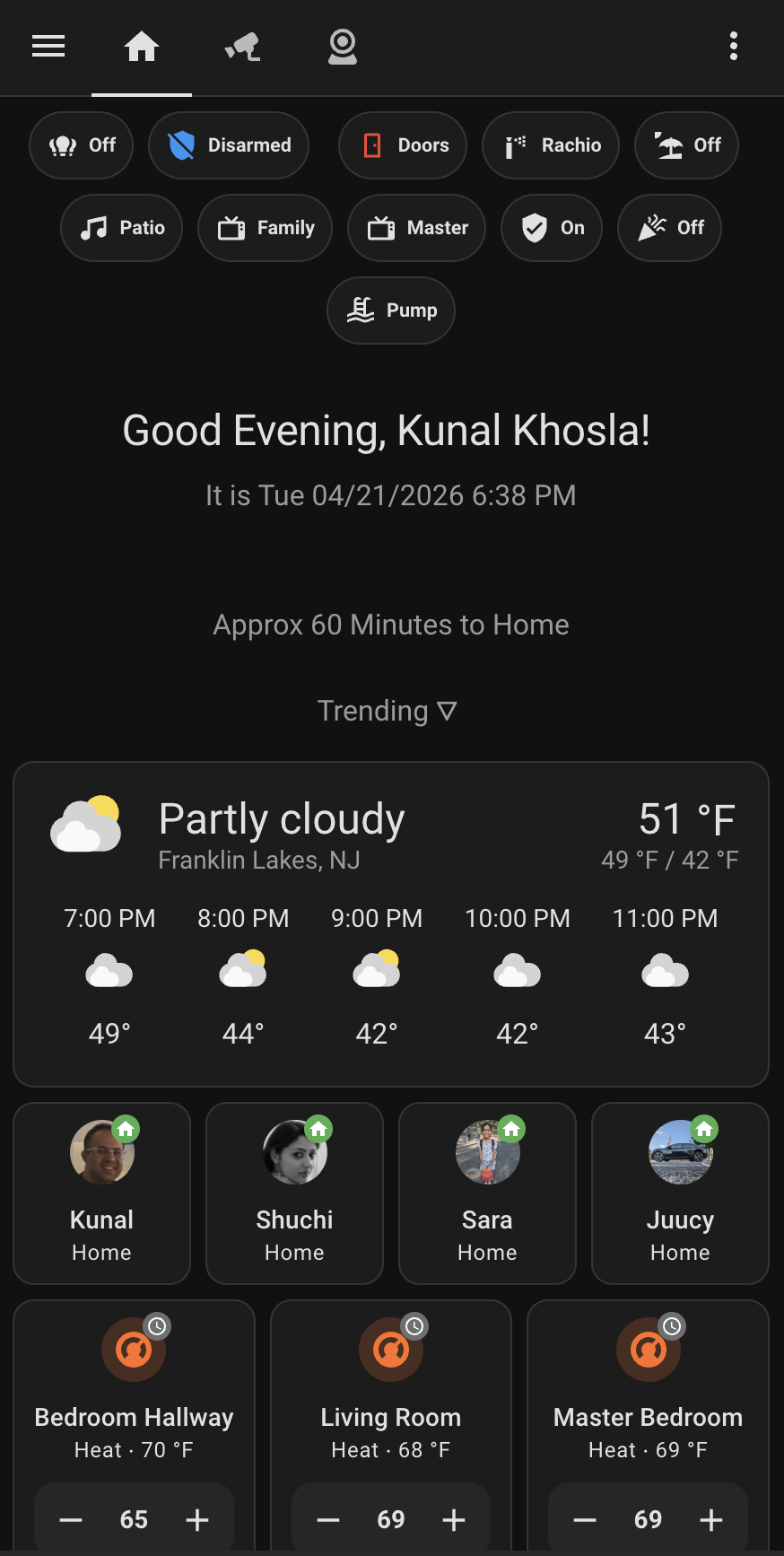
<p>This is what I see when I open the app:</p>

<p><img src="/blogs/assets/images/home-assistant-dashboard.png" alt="Home Assistant dashboard — the landing view of my install" /></p>

<p>Top row is a set of <strong>state pills</strong>: alarm state, whether any door is open, irrigation, patio lights, TVs, the pool pump. Each one is a one-tap toggle and a glance-able current value. No dashboard panel, no deep-link — the pills are the index of “things I touch often.”</p>

<p>Below the greeting is a <strong>commute estimate</strong> and a <strong>weather card</strong>. Then the <strong>presence row</strong>: one avatar per person, with a green home badge when they’re on-network. Underneath, the three <strong>thermostat tiles</strong> for the zones I actively tune.</p>

<p>Past the fold — not in the screenshot — is a list of rooms: <em>Office, Kitchen, Family Room, Living Room, Bedroom Hallway, Master Bedroom</em>. Each one is a tile. Tapping a tile doesn’t toggle anything; it <strong>opens a dedicated page for that room</strong>. Lights, sensors, thermostat, occupancy, entertainment — the controls and readings scoped to that room, with nothing from the rest of the house to scroll through.</p>

<p>The design rule is: the landing page is for <strong>state I want to see</strong>, and the room pages are for <strong>things I want to change</strong>. When someone asks <em>“is the dishwasher still running?”</em>, they don’t read the landing view — they tap the kitchen tile. When I walk into the living room at 9 PM, I don’t need to see the garage thermostat.</p>

<p>This is worth the setup cost because it fixes the one thing Home Assistant does badly out of the box: the default “Overview” wants to show you everything at once. Everything is nothing.</p>

<h2 id="-two-things-id-change">// two things I’d change</h2>

<p>Being honest with myself:</p>

<p><strong>1. Move configuration into <code class="language-plaintext highlighter-rouge">packages/</code>.</strong> My <code class="language-plaintext highlighter-rouge">configuration.yaml</code> is 150 lines and growing. HA has supported <a href="https://www.home-assistant.io/docs/configuration/packages/">packaged configuration</a> for years — one file per domain (kitchen, security, notifications, pool), auto-merged at boot. My current single-file setup works, but reviewing a change means scrolling past unrelated MQTT, template, and <code class="language-plaintext highlighter-rouge">http</code> blocks to find the thing I’m touching. Packages would fix that.</p>

<p><strong>2. Use blueprints for the motion-light pattern.</strong> I have at least seven automations that all boil down to “if motion sensor <code class="language-plaintext highlighter-rouge">X</code> goes <code class="language-plaintext highlighter-rouge">on</code>, turn on light <code class="language-plaintext highlighter-rouge">Y</code>, turn it off after <code class="language-plaintext highlighter-rouge">Z</code> minutes.” Each one was a separate editor session in 2023. A single blueprint with three parameters would replace all of them and give me one place to fix the inevitable edge cases.</p>

<p>Neither of these is urgent. Neither is sexy. Both will pay back fast once I get around to them.</p>

<h2 id="-the-common-thread">// the common thread</h2>

<p>The patterns that have aged well all share one property: they push state and decisions <em>out</em> of individual automations and into structures the whole system can share. Template sensors, scenes, trusted-network auth, safety timers — each one is a tiny reusable primitive that dozens of automations lean on. Nothing in this post required writing a single line of Python; Home Assistant already ships with the toolbox.</p>

<p>The ones I regret were the opposite: one-off automations that repeat logic, that know too much about specific entities, that made perfect sense at 11 PM on a Tuesday and incomprehensible sense six months later.</p>

<p>Build the primitives. Everything else gets cheap.</p>]]></content><author><name>Kunal Khosla</name><email>khosla.kunal@gmail.com</email></author><category term="home-assistant" /><category term="automation" /><category term="smart-home" /><summary type="html"><![CDATA[An audit of my own Home Assistant install — the patterns that earned their keep, and two habits I'd break if I started again.]]></summary></entry><entry><title type="html">Three VLANs, one household: how my home network is actually laid out</title><link href="https://kunalkhosla.github.io/blogs/2026/04/20/home-network-segmentation.html" rel="alternate" type="text/html" title="Three VLANs, one household: how my home network is actually laid out" /><published>2026-04-20T06:00:00-04:00</published><updated>2026-04-20T06:00:00-04:00</updated><id>https://kunalkhosla.github.io/blogs/2026/04/20/home-network-segmentation</id><content type="html" xml:base="https://kunalkhosla.github.io/blogs/2026/04/20/home-network-segmentation.html"><![CDATA[<p>My UniFi controller currently shows the map below. Three VLANs, each with its own subnet, its own SSID, and its own opinions about what’s allowed to talk to what.</p>

<table>
  <thead>
    <tr>
      <th>VLAN</th>
      <th>ID</th>
      <th>Subnet</th>
      <th>Active leases</th>
      <th>What lives here</th>
    </tr>
  </thead>
  <tbody>
    <tr>
      <td>IoT</td>
      <td>1</td>
      <td><code class="language-plaintext highlighter-rouge">192.168.10.0/24</code></td>
      <td>67</td>
      <td>Everything Wi-Fi-connected that you don’t touch daily</td>
    </tr>
    <tr>
      <td>Guest</td>
      <td>2</td>
      <td><code class="language-plaintext highlighter-rouge">192.168.20.0/24</code></td>
      <td>3</td>
      <td>Visitors — captive portal, internet-only</td>
    </tr>
    <tr>
      <td>Primary</td>
      <td>3</td>
      <td><code class="language-plaintext highlighter-rouge">192.168.30.0/24</code></td>
      <td>18</td>
      <td>Humans — phones, laptops, tablets</td>
    </tr>
  </tbody>
</table>

<p>88 active leases right now, and Home Assistant has tracked 193 distinct MAC addresses across them over time. The ratio of “things in the house that are on the internet” to “humans in the house” is roughly 4-to-1 and climbing.</p>

<h2 id="why-three-vlans">Why three VLANs</h2>

<p>Two reasons, in order of how much they bothered me.</p>

<p><strong>1. Trust asymmetry.</strong> Most of the devices on a home network should not be trusted. That Wi-Fi candle from the Christmas box is running a five-year-old ARM firmware with a hard-coded telnet password and a DNS query for some server you’ve never heard of. My laptop and my bank’s 2FA app used to live on the same flat LAN that it did. There’s no compelling technical reason for the candle and the laptop to be able to ping each other, and if the candle ever joins a botnet, I’d prefer it couldn’t ARP-scan my printer.</p>

<p><strong>2. Inventory hygiene.</strong> It’s almost impossible to keep mental track of which device is which on a flat network of 200 clients. Separating “things humans interact with” from “infrastructure that quietly does its job” makes everything easier — finding a device, blocking a device, rebooting a rogue device, auditing what’s phoning home at 3 AM.</p>

<h2 id="the-three-vlans">The three VLANs</h2>

<h3 id="iot-vlan-1-19216810024">IoT (VLAN 1, <code class="language-plaintext highlighter-rouge">192.168.10.0/24</code>)</h3>

<p>The heaviest VLAN by a wide margin — 67 active leases today. Smart bulbs, plugs, cameras, thermostats, the pool pump from <a href="/blogs/2026/04/20/ecoplug-pool-pump.html">last week’s dispatch</a>, the garage-door controllers, every appliance that ships with a Wi-Fi chip, the robot vacuum, the weather station, the irrigation controller.</p>

<p><strong>Home Assistant itself lives here.</strong> HAOS has a DHCP reservation in this subnet. That is the single most important design choice on this page, because:</p>

<ul>
  <li>HA is, by volume, a piece of IoT infrastructure. It talks to 60+ devices that all live on VLAN 1. Keeping HA on the same subnet means cross-VLAN firewall rules aren’t in the hot path — every automation, every poll, every sensor update stays at L2 inside the same broadcast domain.</li>
  <li>It inverts the usual “how do I let HA reach my isolated IoT devices?” question into the much simpler “how do I let my Primary-LAN phone reach HA?” question, which is one firewall rule instead of dozens.</li>
  <li>It also means HA, if it were ever compromised, is already segmented from the machines I bank on. The trust asymmetry stays intact.</li>
</ul>

<h3 id="guest-vlan-2-19216820024">Guest (VLAN 2, <code class="language-plaintext highlighter-rouge">192.168.20.0/24</code>)</h3>

<p>Captive portal. Three active leases, which is honestly about right for an afternoon. Anyone who visits connects, puts in their name, and gets an internet-only connection that’s walled off from both IoT and Primary.</p>

<p>The important bit — easy to miss in UniFi’s UI — is <strong>Client Device Isolation</strong> on the guest SSID. Without it, a friend’s phone can see my parents’ laptop if both are on Guest. With it on, every guest is cordoned into their own tiny bubble.</p>

<h3 id="primary-vlan-3-19216830024">Primary (VLAN 3, <code class="language-plaintext highlighter-rouge">192.168.30.0/24</code>)</h3>

<p>Humans. 18 active leases today — phones, laptops, tablets, the Apple TV in the living room, my work MacBook. Small by device count, but the whole point of segmentation is that these 18 devices are the trusted ones. Primary can reach the internet, it can reach HA on IoT via one specific rule, and it can participate in cross-VLAN casting via mDNS reflection. That’s it. Nothing else reaches into Primary from anywhere.</p>

<h2 id="the-part-nobody-warns-you-about">The part nobody warns you about</h2>

<p>The moment you isolate IoT from Primary, a lot of stuff quietly stops working.</p>

<ul>
  <li>Chromecasts vanish from the phone because mDNS does not cross VLAN boundaries by default.</li>
  <li>SSDP / UPnP discovery for media stops working.</li>
  <li>HomeKit / AirPlay targets on the other VLAN go dark.</li>
  <li>The printer on IoT becomes invisible to the laptop on Primary.</li>
  <li>Any new integration you try in Home Assistant that relies on broadcast discovery silently fails — the integration adds fine, it just finds zero devices.</li>
</ul>

<p>Segmentation is not a free lunch. You pay for it in packets that used to travel freely and now need explicit permission to cross a boundary. UniFi exposes two separate knobs that matter:</p>

<ol>
  <li><strong>Firewall / Traffic rules</strong> — who can open a unicast connection to whom.</li>
  <li><strong>mDNS reflector</strong> per-VLAN toggle — whether multicast service discovery gets repeated into neighboring VLANs.</li>
</ol>

<p>You need both. The firewall gets the data across; the reflector gets the <em>announcement</em> across so the sending side knows the receiver exists.</p>

<h2 id="the-rules-i-wrote">The rules I wrote</h2>

<p>Around half a dozen, all labelled descriptively so future-me remembers why they exist.</p>

<ol>
  <li>
    <p><strong>Allow Primary → HA (8123)</strong> — phones and laptops on Primary need to reach <code class="language-plaintext highlighter-rouge">http://homeassistant.local:8123</code> and its API. One rule, one direction, one port. That’s the Primary-to-IoT bridge in its entirety for day-to-day use.</p>
  </li>
  <li>
    <p><strong>Allow HA → IoT internal ports</strong> — HA lives on IoT so most traffic is intra-subnet, but a few integrations need ports or protocols that the VLAN’s default egress rules would otherwise drop (specifically outbound multicast for certain Wi-Fi plugs and Matter devices). This rule is narrow and exists because one vendor decided their protocol needed TTL &gt; 1.</p>
  </li>
  <li>
    <p><strong>Allow Primary → IoT (cameras + media + mgmt)</strong> — direct RTSP from cameras into VLC on the laptop, Plex on the media server, SSH into the NVR for maintenance. Separate from the HA rule because the audit trail is clearer.</p>
  </li>
  <li>
    <p><strong>Allow Chromecast reflection</strong> — combined with UniFi’s mDNS reflector enabled on both Primary and IoT, this lets the phone’s Cast picker see the Chromecasts on IoT. Without it, casting silently fails with a “device not found” that’s nearly impossible to debug.</p>
  </li>
  <li>
    <p><strong>Allow Guest mDNS for casting</strong> — same idea as #4 but narrower: guests can cast to the living-room TV, which is on IoT. No unicast, no device control, just enough multicast for the Cast picker to populate.</p>
  </li>
  <li>
    <p><strong>Block IoT → Primary</strong> — this is the default, but I have an explicit rule near the top of the chain that drops any IoT-initiated connection into Primary. Belt <em>and</em> suspenders. The day an IoT device gets popped, I want the answer to “could it reach the laptop?” to be no, twice over.</p>
  </li>
  <li>
    <p><strong>Device-group-based egress restrictions</strong> for a handful of devices that should only talk to specific WAN destinations (a couple of appliances I don’t trust with open internet). Per-device isolation at the firewall level is easier once you have a few days of traffic flow data to look at.</p>
  </li>
</ol>

<p>Every rule has a label that names <em>why</em> it exists, not what it does. The what is in the rule body; the why is the part I need to read six months later when the printer stops working.</p>

<h2 id="while-were-here-the-dns-layer">While we’re here: the DNS layer</h2>

<p>One benefit of HA living on the IoT VLAN with a DHCP reservation is that it’s a stable, always-on box with a known IP. Which makes it the obvious place to host <strong>AdGuard Home</strong> — a DNS-level ad and tracker blocker. It runs as an add-on inside HAOS, listens on port 53, and does two things that compound:</p>

<ol>
  <li>
    <p><strong>Blocks ads and trackers at the DNS layer, network-wide.</strong> Every device on every VLAN — the phones on Primary, the TV on IoT, even the guest’s laptop if they’re using DHCP DNS — resolves through AdGuard. Devices that have no plausible way to run their own ad blocker (smart TVs, every IoT appliance that quietly beacons telemetry) get the same filtering for free.</p>
  </li>
  <li>
    <p><strong>Surfaces what’s actually happening on the network.</strong> The AdGuard UI shows which client made which DNS query. When a new IoT gadget gets added and I want to know who it’s phoning home to at 3 AM, I just look — the queries are all there, grouped by client IP. This is the only time I’ve ever found vendor-surveillance concerns to be <em>inspectable</em> rather than hand-wavy.</p>
  </li>
</ol>

<p>The router is configured to hand out HAOS’s IoT-VLAN IP as the DNS server in every DHCP lease, across all three VLANs. AdGuard forwards anything it doesn’t block to a real upstream (1.1.1.1 with DNS-over-TLS).</p>

<p><strong>The tradeoff:</strong> if HA goes down, DNS goes down for the whole house — which, in practice, means the internet feels broken until the box is back. I considered this for a while. Counter-arguments that won me over: HA hasn’t crashed in any way that took out the container in the year I’ve been running this, AdGuard’s own uptime is better than most consumer routers’ built-in DNS, and the “wait, is the internet down?” failure mode is not meaningfully different from “wait, did the router reboot?” — which I used to get from ISP-supplied hardware routinely.</p>

<h2 id="what-id-do-differently">What I’d do differently</h2>

<p><strong>Start with the three VLANs on day one</strong>, not after two years of one flat LAN. Migrating 150+ devices across VLANs means re-pairing a chunk of them, because vendor apps cache the original subnet and the device sullenly refuses to rejoin. Start clean and the pain is frontloaded and smaller.</p>

<p><strong>Put HA on the IoT VLAN from the start.</strong> I did not do this initially; HA was on Primary for about a year. Cross-VLAN firewall rules for every single integration is a worse life than just treating HA as IoT infrastructure and moving it where the traffic naturally is.</p>

<p><strong>DHCP reservations over static IPs.</strong> Every integration doc says “set the device to a static IP.” Don’t. Use DHCP reservations at the controller. If you ever renumber the subnet — as I did when I split the VLANs — it’s one file to edit instead of forty devices to walk around the house to.</p>

<p><strong>Short lease on the IoT VLAN.</strong> Many IoT devices don’t gracefully handle IP changes. A 1-hour lease means when a device misbehaves and you force a rejoin, its old lease is gone by the time it comes back. The default 24-hour lease is purgatory.</p>

<p><strong>Point DHCP at AdGuard before you do anything else.</strong> If I’d started with the DNS layer in place, I would have caught a handful of “that integration sends every API call through a telemetry domain” decisions much earlier.</p>

<h2 id="the-bigger-lesson">The bigger lesson</h2>

<p>Network segmentation at home is mostly a documentation problem disguised as a networking problem. The VLAN setup takes an afternoon. What takes months is <em>remembering</em> which rule applies to what, which device you put on which VLAN, and why the printer stopped working two years later.</p>

<p>Name your VLANs something descriptive. Name your firewall rules better than the UI suggests. Write them down somewhere you’ll actually look. Future-you will be grateful.</p>]]></content><author><name>Kunal Khosla</name><email>khosla.kunal@gmail.com</email></author><category term="home-networking" /><category term="unifi" /><category term="home-assistant" /><category term="vlans" /><summary type="html"><![CDATA[Why my smart house lives on its own VLAN, what the three-network split actually costs, and the firewall rules that keep it from breaking Home Assistant.]]></summary></entry></feed>