What a four-year-old Home Assistant config has taught me
An audit of my own Home Assistant install — the patterns that earned their keep, and two habits I'd break if I started again.
My configuration.yaml was first written in late 2022. It’s survived three HAOS major upgrades, about forty automations, a decent pile of HACS integrations, one whole-house rewire, and one pool pump that needed its Wi-Fi protocol reverse-engineered (see the companion dispatch).
Here’s what’s actually worked — concrete patterns pulled straight from a live install. And two things I’d fix if I started today. Entity names in the examples are genericized; the structure is not.
Split your config from day one
Even a modest house ends up with hundreds of lines of YAML. My configuration.yaml starts with this:
automation: !include automations.yaml
script:     !include scripts.yaml
scene:      !include scenes.yaml

frontend:
  themes: !include_dir_merge_named themes
That single !include trick is what lets the UI editor write to automations.yaml without clobbering my handwritten configuration.yaml. It also means my visual-editor automations and my hand-rolled template sensors can coexist without stepping on each other.
!include_dir_merge_named does the same for a whole folder of theme files. Every integration I add that’s config-heavy eventually earns its own !include.
Secrets file, no exceptions
Any credential goes in secrets.yaml:
some_integration:
  username:  !secret integration_username
  password:  !secret integration_password
  api_token: !secret integration_api_token
secrets.yaml is in .gitignore if you version-control your config (you should). The payoff isn’t just safety — it’s that I can share screenshots or paste snippets anywhere without thinking twice.
Trust your LAN, ban the internet
Two small blocks give a better security posture than most “hardened” setups I’ve seen online:
http:
  ip_ban_enabled: true
  login_attempts_threshold: 10

homeassistant:
  auth_providers:
    - type: homeassistant
    - type: trusted_networks
      allow_bypass_login: true
      trusted_networks:
        - 192.168.1.0/24
Anything on the trusted LAN walks in; anything from the internet gets banned after ten bad guesses. No 2FA nag when someone in the house opens the app at 2 AM; no patience for random brute-force attempts from anywhere else.
Build template sensors that represent intent
The single most-useful sensor in my install isn’t from an integration — it’s five lines of template:
binary_sensor:
  - platform: template
    sensors:
      any_door_open:
        friendly_name: "Any Door Open"
        value_template: >-
          on
Every automation that used to be a multi-way OR — “turn on the foyer light if any of a handful of doors open” — now just watches binary_sensor.any_door_open. When I added a new door sensor last spring, I changed one template and every downstream automation got it for free.
The same pattern shows up for unit conversion, time-of-day flags, “is anyone home”, “is it dark outside”, or any other question my house needs to keep answering.
Safety timers instead of discipline
I used to rely on myself to turn things off. Now I don’t. A representative automation:
alias: Turn off iron after 30 mins
triggers:
  - trigger: state
    entity_id: switch.iron_plug
    to: "on"
    for: "00:30:00"
actions:
  - action: switch.turn_off
    target: { entity_id: switch.iron_plug }
Three lines, two minutes to write, saves your house.
I have a handful of these — appliances that shouldn’t run forever (irons, towel warmers, specific outdoor pumps in cold weather). Every one of them used to depend on me remembering. Now none of them do.
The cold-weather case is the bonus version: a numeric-state trigger on the outdoor temperature sensor cuts power before the outdoor device can damage itself.
Emergencies should have reflexes
Nothing in HA is more satisfying than this automation:
Smoke / Carbon Monoxide Emergency — Announce and Turn OFF HVAC
Triggered by any smoke or CO detector going to
on. Actions: turn off HVAC blower, turn on every light in the house, broadcast a TTS announcement over the speakers.
It’s sixteen lines of YAML and it has never fired in anger. The day it does, I want the house to react while I’m still figuring out what’s happening.
Let the cameras narrate
The camera notification automations used to say:
Motion detected at driveway
Now they use the Google Gen AI integration to caption the frame:
- action: google_generative_ai_conversation.generate_content
  data:
    prompt: >-
      Describe what's happening in this image in one short sentence.
      Focus on the person or vehicle and what they're doing.
    image_filename: /config/www/snapshots/driveway.jpg
The result is notifications like “A delivery driver in a blue polo is leaving a package on the front porch” instead of generic motion pings. The difference in signal-to-noise is enormous.
React to the weather you actually have
Two automations I’m proud of because they replace judgment I used to exercise manually:
- Close awning if raining — triggers on
weather.hometransitioning torainyorpouring. - Close awning if windy — numeric-state trigger on wind speed above a threshold.
These aren’t clever. They just mean a retractable awning stops being a weekend chore.
Scenes as named states, not light shows
My scenes aren’t for ambiance — they’re for states the house can be in:
Away— relevant automations flip into their away posture.All Lights On— what it says, for when something goes wrong.Bedtime— coming in a future refactor.
Scenes are checkpoints. Automations can call them with one line, which keeps the individual automations clean.
HACS for anything that isn’t native
Sixteen custom integrations currently live in /config/custom_components/, installed via HACS. Plus one I wrote myself for the pool pump last Saturday.
The rule I’ve settled on: if the first-party integration doesn’t exist, or if it requires a cloud account I don’t want to maintain, check HACS before I assume I’m stuck. Nine times out of ten someone’s already done the work — and when they haven’t, the Jekyll theme next door shows it’s surprisingly tractable to fill in.
the dashboard, room by room
This is what I see when I open the app:
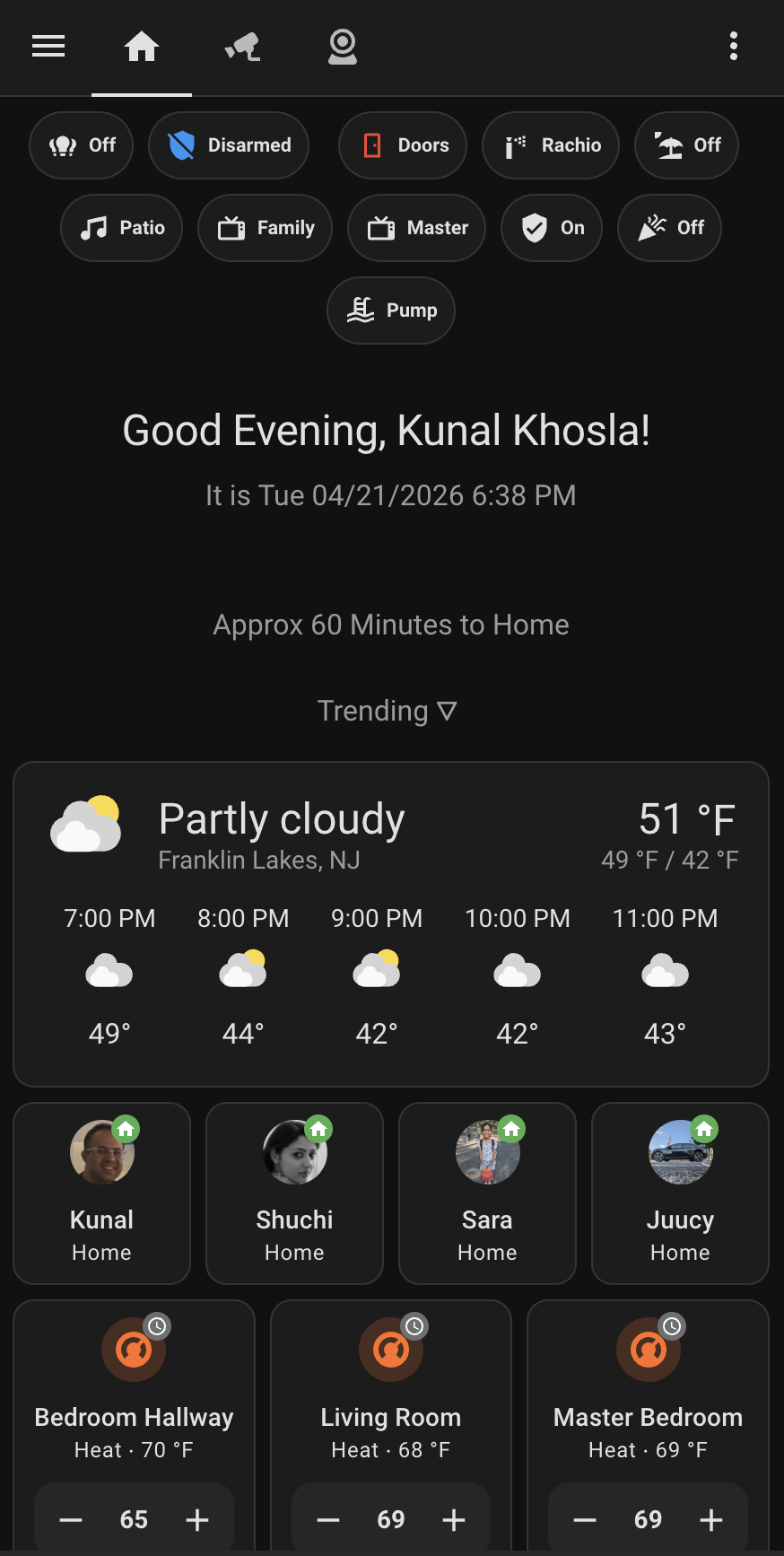
Top row is a set of state pills: alarm state, whether any door is open, irrigation, patio lights, TVs, the pool pump. Each one is a one-tap toggle and a glance-able current value. No dashboard panel, no deep-link — the pills are the index of “things I touch often.”
Below the greeting is a commute estimate and a weather card. Then the presence row: one avatar per person, with a green home badge when they’re on-network. Underneath, the three thermostat tiles for the zones I actively tune.
Past the fold — not in the screenshot — is a list of rooms: Office, Kitchen, Family Room, Living Room, Bedroom Hallway, Master Bedroom. Each one is a tile. Tapping a tile doesn’t toggle anything; it opens a dedicated page for that room. Lights, sensors, thermostat, occupancy, entertainment — the controls and readings scoped to that room, with nothing from the rest of the house to scroll through.
The design rule is: the landing page is for state I want to see, and the room pages are for things I want to change. When someone asks “is the dishwasher still running?”, they don’t read the landing view — they tap the kitchen tile. When I walk into the living room at 9 PM, I don’t need to see the garage thermostat.
This is worth the setup cost because it fixes the one thing Home Assistant does badly out of the box: the default “Overview” wants to show you everything at once. Everything is nothing.
// two things I’d change
Being honest with myself:
1. Move configuration into packages/. My configuration.yaml is 150 lines and growing. HA has supported packaged configuration for years — one file per domain (kitchen, security, notifications, pool), auto-merged at boot. My current single-file setup works, but reviewing a change means scrolling past unrelated MQTT, template, and http blocks to find the thing I’m touching. Packages would fix that.
2. Use blueprints for the motion-light pattern. I have at least seven automations that all boil down to “if motion sensor X goes on, turn on light Y, turn it off after Z minutes.” Each one was a separate editor session in 2023. A single blueprint with three parameters would replace all of them and give me one place to fix the inevitable edge cases.
Neither of these is urgent. Neither is sexy. Both will pay back fast once I get around to them.
// the common thread
The patterns that have aged well all share one property: they push state and decisions out of individual automations and into structures the whole system can share. Template sensors, scenes, trusted-network auth, safety timers — each one is a tiny reusable primitive that dozens of automations lean on. Nothing in this post required writing a single line of Python; Home Assistant already ships with the toolbox.
The ones I regret were the opposite: one-off automations that repeat logic, that know too much about specific entities, that made perfect sense at 11 PM on a Tuesday and incomprehensible sense six months later.
Build the primitives. Everything else gets cheap.